
If you’re serious about gaming, your keyboard is more than just a tool—it’s an extension of your skills and style. Choosing the right RGB mechanical keyboard can enhance your gameplay, improve your typing experience, and bring a vibrant aesthetic to your setup.
You’ll find that the tactile feedback, customizable lighting, and durable build of these keyboards can make a noticeable difference whether you’re grinding through intense sessions or just enjoying casual play. This guide will help you discover options that fit your needs and budget, so you can level up your gaming setup with confidence.
Top Picks
| Category | Product | Price | Score |
|---|---|---|---|
| 🏆 Best Overall | AULA F75 Pro Wireless Mechanical Keyboard | 92/100 | |
| 💰 Best Value | Redragon K556 RGB LED Backlit Wired Mechanical Gaming Keyboard | 88/100 | |
| 🎯 Best for Beginners | RK ROYAL KLUDGE S108 Typewriter Keyboard | 85/100 | |
| ⚡ Best Performance | CORSAIR K70 CORE RGB Mechanical Wired Gaming Keyboard | 90/100 | |
| 🚀 Most Advanced | Logitech G915 LIGHTSPEED RGB Mechanical Gaming Keyboard | 91/100 |
How We Chose These RGB Mechanical Keyboards
We focused on keyboards that offer a great balance of performance, build quality, and customization options. Key factors included the type of mechanical switches, RGB lighting capabilities, connectivity options (wired or wireless), durability, and user feedback on typing feel and reliability. We also considered additional features like hot-swappable keys, media controls, and software customization to ensure you get a keyboard that fits your gaming style and workspace.
Redragon K556 RGB

If you’re looking to upgrade your gaming setup without overcomplicating things, the Redragon K556 RGB is a solid pick. It’s got that satisfying tactile feel thanks to the brown switches, and the hot-swappable design means you can easily swap out switches if you want to experiment with different feels. The aluminum base gives it a sturdy, premium vibe that stays put on your desk, and the RGB lighting offers plenty of customization to match your mood or setup.
Whether you’re grinding through long gaming sessions or just typing away at work, this keyboard balances comfort and style nicely. Plus, the included software lets you tweak lighting and macros, so you can personalize it without diving into anything too technical. It’s a great all-rounder if you want a dependable mechanical keyboard that looks as good as it performs.
What People Say
People appreciate the solid build and satisfying typing experience, especially the brown switches that aren’t too loud but still tactile. The RGB lighting customization and hot-swap feature get a lot of love, making it easy to personalize. Some mention the keyboard’s weight as a plus since it stays put, and the included tools for switch swapping are a nice bonus.
🗣️ Doc Gerbil
This keyboard feels really solid and the typing experience is smooth without being too loud. The brown switches give just the right amount of feedback, and I love that the lights are customizable through the Redragon software. It’s heavy and durable, so it doesn’t slide around, and having the option to use it wired or wireless is a nice bonus. Definitely recommend if you want a reliable backlit keyboard for gaming or everyday use.
🗣️ Mike
I’ve had this keyboard for years now and it’s held up great. The aluminum chassis feels premium and the brown switches are perfect for both gaming and typing. The onboard RGB controls are handy, and while the software is basic, it does the job for customizing lighting and macros. The key puller and extra switches are a nice touch too. Overall, it’s a fantastic quality keyboard that rivals pricier brands.
Ease of Use
| Feature | Ease Level |
|---|---|
| Hot-Swap Switches | Easy |
| RGB Lighting Controls | Moderate |
| Software Customization | Moderate |
| Keycap Removal | Easy |
| Onboard Brightness Adjustment | Easy |
Looks and Feel
The keyboard has a sleek, modern look with a brushed aluminum finish that feels premium. The RGB lighting is vibrant and offers plenty of modes, though some users notice slight inconsistencies in brightness across the keys.
Overall, it adds a cool, customizable glow to your setup without being over the top.
What’s New
The standout feature here is the true hot-swap capability, which supports nearly all 3-pin and 5-pin mechanical switches. This means you can easily swap switches without soldering, giving you freedom to tailor the keyboard’s feel over time.
The inclusion of noise-absorbing foams also helps keep the typing experience quieter than you might expect from a mechanical keyboard.
Why You’ll Like It
- Hot-swappable switches let you customize your typing feel easily
- Sturdy aluminum base keeps the keyboard stable during intense sessions
- Soft tactile brown switches balance quietness and feedback
- Customizable RGB lighting with multiple presets and software support
- Includes keycap and switch pullers plus spare switches for personalization
Rating: 4.5 (total: 9,093+)
AULA F75 Pro

If you want a compact keyboard that fits your gaming and work life without hogging desk space, the AULA F75 Pro is worth checking out. It’s got a 75% layout that keeps all the essentials but stays neat and portable.
The gasket-mounted design makes typing feel cushioned and less tiring, which is great for those long sessions. You can connect it three ways—Bluetooth, 2.4GHz wireless, or USB-C wired—so switching between devices is hassle-free. The RGB lighting is vibrant with tons of effects to play with, and the multi-function knob is a handy touch for quick volume or brightness tweaks.
Whether you’re gaming, typing up assignments, or just browsing, this keyboard blends style, comfort, and solid performance in a way that’s easy to appreciate.
What People Say
Users love how smooth and responsive the keyboard feels, especially for fast gaming and long typing sessions. The sound is praised as satisfying but not too loud, and the RGB lighting customization gets a lot of positive mentions. The sturdy build and weight keep it stable on the desk, and the hot-swappable switches are a big plus for those who like to tinker.
🗣️ Brayden
The Aula F75 pro is an amazing keyboard. I bought it after my Hyperx board broke and I needed a new one. I’ve seen this one on TikTok, and as someone who plays fast/intense games as well as doing lots of schoolwork and typing, it is awesome. The keyboard feels so smooth and there’s zero delay at all (wired connection) and not to mention the sound.. best sounding keyboard ever. It even came with extra features like a keycap puller and extra switches, the RGB is super good too. Overall, I 100% recommend this keyboard for gaming, typing, work, etc. Best keyboard I’ve ever used.
🗣️ Jeremy Teubert
I love this little guy. My first foray into mechanical keyboards. The aluminum body is super premium, the keys travel excellently. I switched the caps out for some walnut-style double shots that match my setup. And the weight of the unit really keeps it anchored well to my desk, no sliding or movement at all (and as a pianist, I’m heavy on the keys with a fairly high WPM typing speed, so I’ve really put this thing through its paces.) I HATE the keyboard ASMR you see on tons of videos. And I honestly didn’t know how much I’d enjoy the auditory nature of the keys. But it’s not too loud at all. A pleasant bit of white noise that adds to my working ambience. This keyboard is a huge value for the money. I use it for 8 hours a day while I’m working and never feel any kind of strain at all. The ergonomics are great for all-day typing. I’m not big on RGB, I’m more of an understated looks kind of guy in my setup. But the ability to customize the lighting is expansive, tons of options to find a style that fits your vibe. I can’t speak to the battery life, as I run it in the wired config. But the ergos are awesome. The angle of the board and height off the desk encourage good typing posture. The clickable wheel is great for controlling whatever you need it to. The ability to edit keys individually to meet your needs in the software is great. I’m super pleased with this kb overall, I’ve enjoyed every second of its use.
Ease of Use
| Feature | Ease Level |
|---|---|
| Hot-Swappable Switches | Easy |
| RGB Lighting Controls | Moderate |
| Multi-Device Connectivity Switching | Easy |
| Software Customization | Moderate |
| Volume and Lighting Knob | Easy |
Looks and Feel
The keyboard sports a sleek, modern look with side-printed PBT keycaps that resist fading and let the RGB lighting shine through nicely. Its gradient black color scheme adds a subtle but stylish vibe that fits well with most setups.
The compact size and clean design make it a great visual fit whether you’re going for a minimalist or flashy look.
What’s New
What stands out is the combination of a gasket-mounted structure with a hot-swappable PCB, which isn’t always easy to find in this price range. The triple-mode connectivity is also a smart touch, letting you seamlessly switch between devices without fuss. Plus, the multi-function knob for volume and lighting control adds a practical and unique flair.
Why You’ll Like It
- Hot-swappable switches let you easily swap out and customize your typing feel
- Tri-mode connectivity means you can switch between Bluetooth, 2.4GHz wireless, and USB-C wired
- Gasket-mounted design softens typing for longer comfort during gaming or work
- 16.8 million RGB colors with multiple lighting effects and easy control knob
- Compact 75% layout saves desk space without losing important keys
Rating: 4.6 (total: 424+)
RK ROYAL KLUDGE S108

If you’re into that vintage vibe but want all the perks of a modern mechanical keyboard, the RK ROYAL KLUDGE S108 nails it. It looks like an old-school typewriter with those round, steampunk-style keys, but don’t let that fool you — it’s built for serious gaming and typing.
The blue switches give you that satisfying click and tactile feel, so every keystroke feels intentional. Plus, the RGB lighting is super customizable with tons of modes and a cool transparent sidelight that really sets the mood.
The detachable wrist rest is a nice touch, helping keep your wrists comfy during long sessions. Whether you’re grinding through work or gaming late into the night, this keyboard adds a unique style and solid performance to your setup.
What People Say
People appreciate how the keyboard blends retro aesthetics with modern gaming features. The clicky blue switches get a lot of love for their satisfying feel, and the RGB lighting is praised for being bright and customizable.
The wrist rest and sturdy build make it comfortable for hours of typing or gaming.
🗣️ GK
I was a bit worried about the round keys at first, but honestly, getting used to them was easier than I thought. The tactile feedback and audible clicks make typing feel satisfying, and the RGB lighting is bright and vibrant even in well-lit rooms. The wrist rest helps a lot with comfort, and the keyboard remembers your lighting settings after unplugging. It’s a great mix of style and function.
🗣️ Jodi Garrigus
This keyboard feels like a blast from the past with a modern twist. The keys respond immediately, and the wrist rest is super comfortable. I love playing with the different RGB colors — they’re really vibrant and add a fun touch to my desk. It’s exactly what I wanted after struggling with flat keyboards that just didn’t feel right for long typing sessions.
Ease of Use
| Feature | Ease Level |
|---|---|
| Plug and Play Setup | Easy |
| RGB Lighting Modes | Moderate |
| Switching Keycaps | Moderate |
| Wrist Rest Attachment | Easy |
| Compatibility with Multiple OS | Easy |
Style and Design
This keyboard stands out with its vintage typewriter look, featuring round, raised keycaps and a matte black metal panel that feels sturdy and classy. The RGB sidelight adds a modern glow that complements the retro design perfectly, making your setup look both nostalgic and fresh.
What’s Different
The S108 combines retro typewriter aesthetics with modern mechanical keyboard tech, including customizable RGB sidelight and a detachable wrist rest. The ability to swap between vintage and standard keycaps adds a personal touch you don’t see every day.
Why You’ll Love It
- Classic typewriter-style round keycaps for a unique, tactile typing experience
- Blue mechanical switches offer satisfying clicky feedback and precise key response
- Customizable RGB backlighting with 168 modes and adjustable brightness and speed
- Detachable ergonomic wrist rest to keep your hands comfortable during long use
- Full 108-key anti-ghosting layout ensures every keypress registers, even in intense gaming
Rating: 4.5 (total: 7,049+)
CORSAIR K70 CORE RGB

If you want a keyboard that feels smooth and responsive whether you’re gaming or typing up a storm, the CORSAIR K70 CORE RGB is a solid pick. The red linear switches are super quiet and buttery, so you won’t get tired of the sound or feel. Plus, the sound dampening foam really cuts down on that sharp mechanical noise, which is a nice bonus if you share your space. The media dial and programmable buttons make adjusting volume or skipping tracks effortless, and the RGB lighting is fully customizable through iCUE, letting you create a setup that’s truly yours.
The magnetic palm rest adds comfort for those long sessions, making it a great all-rounder for daily use and marathon gaming nights.
What People Say
Gamers and typists alike appreciate how this keyboard balances smooth, quiet keys with solid build quality. The media controls and volume dial get a lot of praise for making adjustments quick and easy, while the RGB lighting customization lets you personalize your setup without hassle.
🗣️ Nick
I’ve been using the Corsair K70 RGB MK.2 for a few months now, and it’s been a fantastic addition to my setup. The Cherry MX Red switches are smooth and quiet, making it perfect for both gaming and typing. The RGB lighting is vibrant and customizable, and I love how I can sync it with my other Corsair peripherals using the iCUE software. The aluminum frame gives it a premium feel, and the wrist rest adds comfort during long gaming sessions. The dedicated media controls and volume wheel are super convenient, and the USB passthrough port is a nice touch. Overall, it’s a top-notch keyboard that combines performance, aesthetics, and durability.
🗣️ Chris
If you can believe I’ve been using this keyboard for 10 years now. What a fantastic value for the money. This keyboard has beautiful customizable RGB, and lets you setup custom macros. The keyboard I chose has cherry red switches which are nice and smooth, quiet and easy to actuate. The keyboard is hefty with minimal deck flex, and can connect with two USB ports for power. Newer versions of this keyboard may have a textured spacebar just to make me sad, but I love the minimal clean design of the original. When I spilled a soda on this keyboard, I obviously had to buy the same one again, and swap out the spacebar.
Ease of Use
| Feature | Ease Level |
|---|---|
| Plug and Play Setup | Easy |
| iCUE Software for RGB and Macros | Moderate |
| Attaching Palm Rest | Easy |
| Using Media Control Dial | Easy |
| Switching Profiles Onboard | Moderate |
Look and Feel
The sleek black aluminum frame combined with vibrant per-key RGB lighting makes this keyboard look sharp on any desk. The magnetic palm rest has a soft-touch finish that feels premium and adds a subtle contrast to the sturdy build.
It’s a clean, modern look that fits well whether you’re gaming or working.
What’s New
What sets this keyboard apart is the combination of pre-lubed linear switches with dual sound dampening layers, which really smooths out the typing experience. The multi-function media dial is a smart addition that lets you control volume and media without interrupting your flow, and the ability to save multiple RGB and macro profiles onboard means your settings travel with the keyboard.
Why You’ll Like It
- Smooth and quiet red linear mechanical switches for satisfying keystrokes
- Two layers of sound dampening foam reduce noisy clacks during use
- Multi-function rotary dial and programmable media button for easy control
- Durable aluminum top plate adds stability and a premium feel
- Magnetic detachable soft-touch palm rest for added comfort
Rating: 4.3 (total: 3,173+)
Logitech G915 LIGHTSPEED
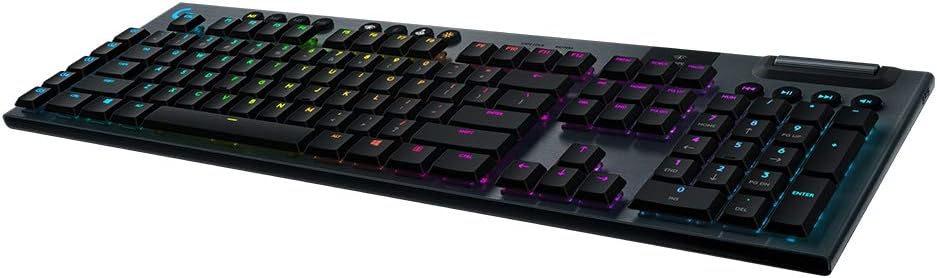
If you’re looking to upgrade your gaming setup with something that feels premium and performs like a champ, the Logitech G915 LIGHTSPEED is worth checking out. It’s wireless but doesn’t skimp on responsiveness, thanks to its pro-grade 1 ms LIGHTSPEED connection.
The low-profile GL Clicky switches give you that satisfying tactile feedback without being too loud or bulky, which is great if you want a sleek desk setup. The RGB lighting is fully customizable per key, and it even reacts to your games and media for some cool effects.
Plus, the aluminum frame keeps it sturdy but slim, so it looks as good as it feels. Whether you’re gaming, streaming, or just typing away, this keyboard blends style and function in a way that’s easy to appreciate.
What People Say
Gamers love how this keyboard combines wireless freedom with fast, reliable performance. The low-profile keys feel great for both gaming and typing, and the customizable RGB lighting adds a personal touch without being overwhelming. Plus, the battery life and build quality get plenty of praise.
🗣️ Casey Kelley
This keyboard feels like a serious upgrade. The build is solid with a nice brushed aluminum finish, and the keys have a subtle click that’s not too loud but still satisfying. The LIGHTSYNC RGB lighting is bright and easy to customize with the G Hub app, which is actually pretty user-friendly. I especially like the Game Mode key that disables the Windows key so you don’t accidentally minimize your game. Battery life has been great, lasting well over a week with RGB on, and the volume wheel feels premium. The only thing to get used to is the low-profile keys if you’re used to taller ones, but overall it’s a fantastic keyboard that really improves your experience.
🗣️ Adam
I use this keyboard daily and it’s a big step up from my old one. Typing is smooth and quiet, and the volume slider is surprisingly handy. The wireless connection has been rock solid with no dropouts, and the battery lasts a long time. The RGB lighting took a bit to figure out but once set, it looks great. The price is a bit high, but if you want a sleek, wireless mechanical keyboard that performs well, this is a solid choice.
Ease of Use
| Feature | Ease Level |
|---|---|
| Wireless Setup with LIGHTSPEED Receiver | Easy |
| Bluetooth Pairing | Moderate |
| G Hub Software for Lighting and Macros | Moderate |
| Using Dedicated Media Controls | Easy |
| Adjusting Volume Wheel | Easy |
Look and Feel
The G915’s slim profile and brushed aluminum frame give it a sleek, modern look that fits perfectly on any desk. The per-key RGB lighting is bright and vibrant without being overpowering, and the subtle Logitech G logo lighting adds a nice design touch.
It’s a keyboard that looks as good as it performs.
What’s New
What stands out here is the combination of wireless LIGHTSPEED tech with low-profile mechanical switches, delivering both speed and comfort without the bulk of traditional mechanical keyboards. The per-key LIGHTSYNC RGB lighting that reacts to your games and media adds a dynamic edge, while the dedicated media controls and volume wheel make everyday use effortless.
Why You’ll Like It
- Pro-grade 1 ms LIGHTSPEED wireless for lag-free gaming
- Low-profile GL Clicky switches with tactile feedback and subtle sound
- Customizable per-key LIGHTSYNC RGB lighting that reacts to games and media
- Durable, slim aircraft-grade aluminum alloy frame
- Dedicated media controls and a precision volume wheel for easy adjustments
Rating: 4.4 (total: 14,198+)
FAQ
What Should I Consider When Choosing an RGB Mechanical Keyboard for Gaming?
When picking an RGB mechanical keyboard, you want to think about the type of switches it uses since that affects how the keys feel and sound. For example, brown switches offer a nice tactile bump without being too loud, which is great if you want feedback without disturbing others.
Also, consider the build quality — keyboards with aluminum bases like the Redragon K556 tend to be sturdier and more durable. Connectivity options matter too; some keyboards offer wired, wireless, or even Bluetooth modes, so choose what fits your setup best.
Don’t forget about customization — good software can let you personalize RGB lighting and macros, but some programs might be a bit clunky, so check user reviews. Lastly, think about the keyboard size and layout to make sure it fits your desk space and gaming style.
How Do RGB Mechanical Keyboards Improve My Gaming Experience?
RGB mechanical keyboards can really level up your gaming setup by giving you precise, responsive key presses thanks to mechanical switches. The tactile feedback helps you avoid missed inputs during intense gameplay.
Plus, customizable RGB lighting isn’t just for looks — you can set different colors or effects for specific keys or game profiles, making it easier to find important controls quickly. Some keyboards even let you save multiple lighting profiles that stay active across devices. Beyond gaming, the satisfying sound and feel of mechanical keys can make typing more enjoyable, whether you’re chatting with teammates or working between sessions.
Are There Any Common Issues I Should Be Aware Of With RGB Mechanical Keyboards?
A few things to watch out for include software quirks, lighting inconsistencies, and the learning curve if you’re new to mechanical keyboards. Some keyboards’ customization software might be basic or require running as administrator, which can be a bit annoying at first. Lighting can sometimes have uneven brightness or limited color temperature options, so if you’re picky about your RGB look, test that out.
Also, mechanical keyboards often have a different key feel and spacing compared to membrane ones, so expect a short adjustment period. Lastly, durability varies — while many users enjoy years of use, some report issues like keycaps breaking or hardware failures after a few months, so it’s good to check warranty and support options before buying.
Wrapping Up
Upgrading to an RGB mechanical keyboard can transform your gaming and typing experience by providing responsive keys, customizable lighting, and durable construction. Whether you want a wireless setup with premium features like the AULA F75 Pro, a budget-friendly but solid choice like the Redragon K556, or a unique retro vibe with the RK ROYAL KLUDGE S108, there’s something here for you.
The CORSAIR K70 CORE and Logitech G915 offer advanced performance and sleek designs if you’re ready to invest in top-tier gear. By choosing the right keyboard, you’re not just enhancing your setup visually—you’re improving comfort, accuracy, and overall satisfaction every time you play or work.
| Product | Image | Rating | Highlights | Pros | Cons |
|---|---|---|---|---|---|
| Redragon K556 RGB LED Backlit Wired Mechanical Gaming Keyboard | | 4.5/5 (9,093 reviews) | 104 Keys, Hot-Swap, Aluminum Base, RGB Backlighting | Great build quality, customizable RGB, good tactile feedback | Some issues with longevity reported |
| AULA F75 Pro Wireless Mechanical Keyboard | | 4.6/5 (424 reviews) | 75% Layout, Hot-Swappable, RGB Backlit, Triple Connectivity | Smooth typing experience, good battery life, customizable lighting | Software could be improved |
| RK ROYAL KLUDGE S108 Typewriter Keyboard |  | 4.5/5 (7,049 reviews) | Retro Design, RGB Backlit, Detachable Wrist Rest | Unique design, good RGB options, comfortable wrist rest | Takes time to get used to round keycaps |
| CORSAIR K70 CORE RGB Mechanical Wired Gaming Keyboard |  | 4.3/5 (3,173 reviews) | RGB Lighting, Media Control Dial, Sound Dampening | Excellent build quality, customizable RGB, responsive keys | Pricey compared to similar options |
| Logitech G915 LIGHTSPEED RGB Mechanical Gaming Keyboard | | 4.4/5 (14,198 reviews) | Low Profile, LIGHTSPEED Wireless, Customizable RGB | Sleek design, excellent battery life, responsive keys | High price point, low profile may not suit everyone |
This Article is reader-supported. When you click through links we may earn a referral commission on qualifying purchases.