
You want a handheld that fits how you play this holiday season, and this Steam Deck vs. ASUS ROG Ally handheld gaming consoles comparison helps you do exactly that. This guide cuts through specs, real-world tradeoffs, and value so you can pick the device that actually matches your gaming habits — whether you care most about game library, display quality, or Windows-native performance.
Top Picks
Category | Product | Score |
|---|---|---|
🏆 Best for Steam Library | 92/100 | |
🎯 Best for Game Pass | 82/100 |
Selection Criteria
You want an honest, useful comparison, so we judged each handheld on the things that matter when you actually use one. Key factors: performance (native and cloud), display quality and refresh rate, battery life in real-world play, ergonomics and comfort for long sessions, game library and platform integration (Steam, Game Pass, Epic), software stability and driver support, and overall value at the listed price.
We also weighted reliability and user experience more heavily because a handheld that requires constant troubleshooting will cost you time and frustration.
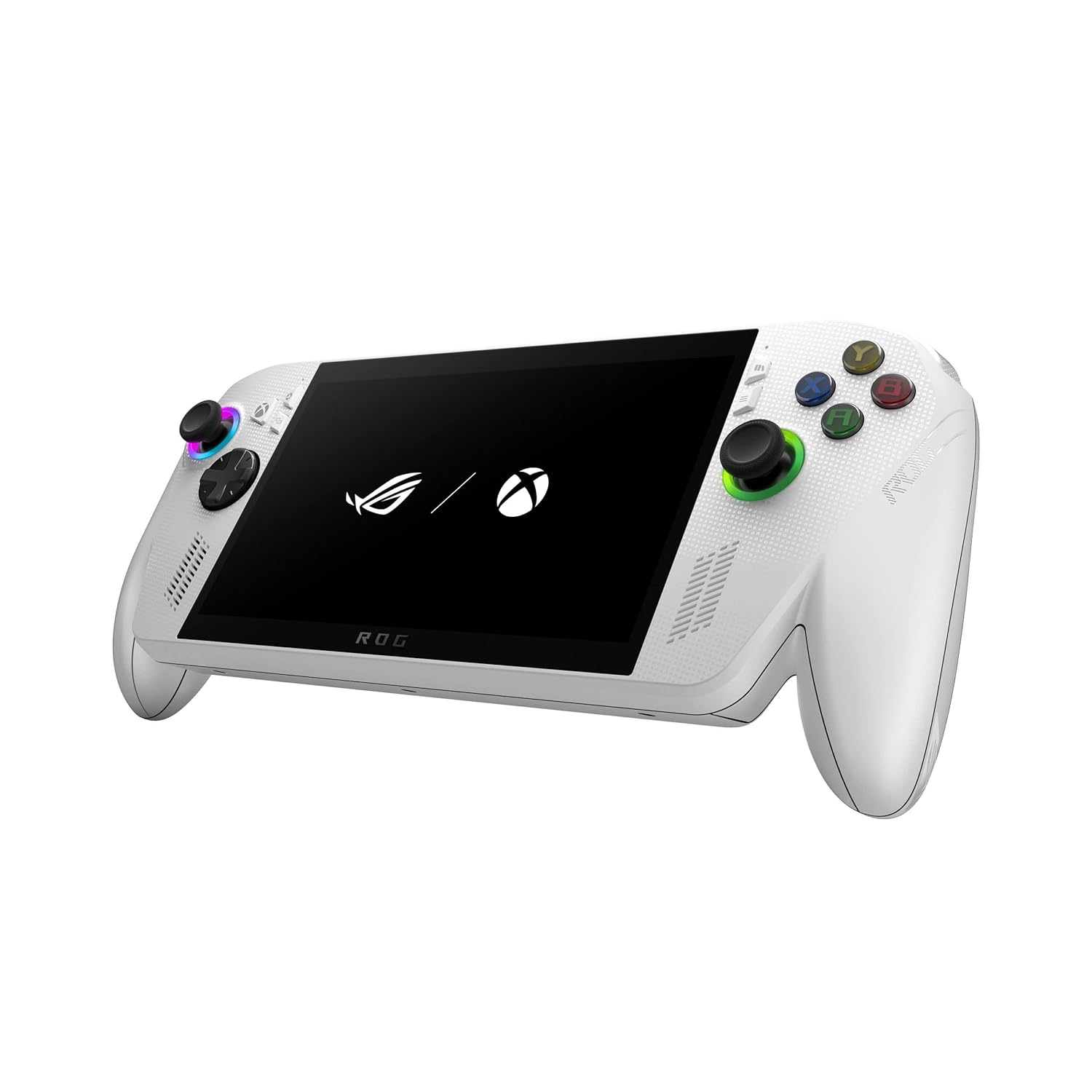
ASUS ROG Xbox Ally Z2

If you like the idea of a pocket-sized gaming PC that boots straight into the Xbox experience, the ROG Xbox Ally Z2 is built for you. It runs Windows 11 so you can play from Xbox Game Pass, Steam, Epic and other PC stores without juggling devices, and the 7″ FHD 120Hz screen plus FreeSync Premium keeps motion smooth for fast-paced games.
The Ryzen Z2 A chip and 16GB of LPDDR5 make this one feel surprisingly capable for a handheld, and the redesigned Xbox-style grips make longer sessions less tiring. Practical uses range from quick commutes where you want to sink into a session, to couch co-op when you dock it to a TV via the USB-C ports.
Be aware it behaves like a small PC — you get flexibility, but sometimes you’ll spend time on updates or tweaks. If you’ve been looking at alternatives like the Steam Deck or the Lenovo Legion Go, the Ally leans more toward seamless Xbox integration and a higher-refresh display; it’s a solid pick if you value that ecosystem and display performance more than an out-of-the-box, appliance-like experience.
What People Say
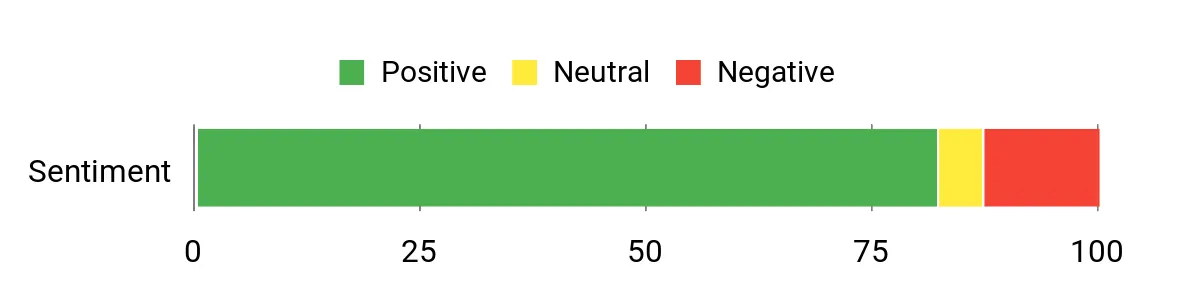
Most folks appreciate how the Ally brings Xbox Game Pass and PC storefronts together, praising the sharp 120Hz screen and the comfortable, controller-like grips. You’ll also see a lot of mentions about strong raw performance for a handheld and fast storage. On the flip side, many customers note that Windows updates, occasional software quirks and some quality-control reports (like stick drift) mean you might spend time troubleshooting compared with more appliance-like handhelds.
Overall Sentiment: Mixed
Pros | Cons |
|---|---|
✅ Excellent Xbox/Game Pass and PC game compatibility | ❌ Runs full Windows — more flexible but can require setup and updates |
✅ High-refresh 120Hz FHD display with good brightness | ❌ Some users report stick drift and other QC issues |
✅ Strong performance with Ryzen Z2 A and 16GB RAM | ❌ Battery life varies by title and settings |
✅ Ergonomic, Xbox-inspired grips and balanced weight | ❌ Customer support and repair options have mixed reports |
✅ Fast charging and decent battery capacity for the category |
Situational Benefits
Situation | How It Helps |
|---|---|
Commuting or short breaks | You can jump into cloud or native PC games on a crisp 120Hz screen, making short rides or coffee breaks feel like genuine play sessions. |
Long flights and travel | The contoured grips and balanced weight help prevent hand fatigue, and fast charging means you can top up quickly between connections. |
Couch gaming with friends | Dock it via USB-C to a TV, connect controllers and you’ve effectively got a compact living-room setup without moving your main PC or console. |
PC library portability | Because it runs Windows, you can carry your Steam, Epic and other PC game libraries with you and pick up where you left off on your PC or Xbox. |
Versatility
You’re getting a handheld that’s more like a portable PC than a closed ecosystem. Install games from multiple stores, add mods, or plug in a keyboard and mouse — it adapts to how you like to play.
Innovation
The Ally’s combination of ROG hardware design with an Xbox-first experience is smart: it bridges two worlds so you don’t need to choose between PC flexibility and Xbox convenience.
Comfort
If you play for hours, the redesigned Xbox-style grips and balanced weight feel noticeably better than many earlier handhelds. You’ll still want breaks for marathon sessions, but the Ally makes them less strenuous.
Travel Friendliness
It’s compact enough to fit a bag and sturdy enough for travel, and fast charging helps when you’ve only got short layovers. Keep in mind it’s still a full Windows device, so plan for occasional updates.
Performance & Speed
For a handheld, the Ryzen Z2 A with 16GB RAM delivers solid frame rates on many titles, especially when paired with the 120Hz display; cloud gaming via Game Pass also runs smoothly when your connection is good.
Key Benefits
- Xbox Game Pass and Windows library access in one handheld
- Smooth 7” 120Hz display with FreeSync Premium
- Comfortable Xbox-inspired ergonomics for long play
- Fast memory and SSD for quick load times
- Quick-charge and a 60Whr battery for extended sessions
Rating: 4.2 (total: 223+)
VALVE Steam Deck OLED 1TB

If you want a handheld that feels like a mini gaming PC but still behaves like an appliance, the Steam Deck OLED is aimed at you. You get a gorgeous 7.4″ HDR OLED screen with up to 90Hz refresh, a roomy 1TB NVMe SSD and 16GB of LPDDR5 memory, all wrapped in Valve’s SteamOS experience so launching and managing your Steam library is straightforward. It’s great for quick sessions on the commute, sinking into indies and older AAA titles, or turning into a desktop with a dock and a monitor. Compared with other options like the ASUS ROG Ally, this leans more toward a polished, Steam-first experience in the handheld gaming consoles comparison — you trade some raw modern-CPU muscle for smoother software integration and the OLED look.
If you want something that’s easy to pick up, plays your existing Steam library well, and looks fantastic on screen, this is a smart choice to consider.
What People Say
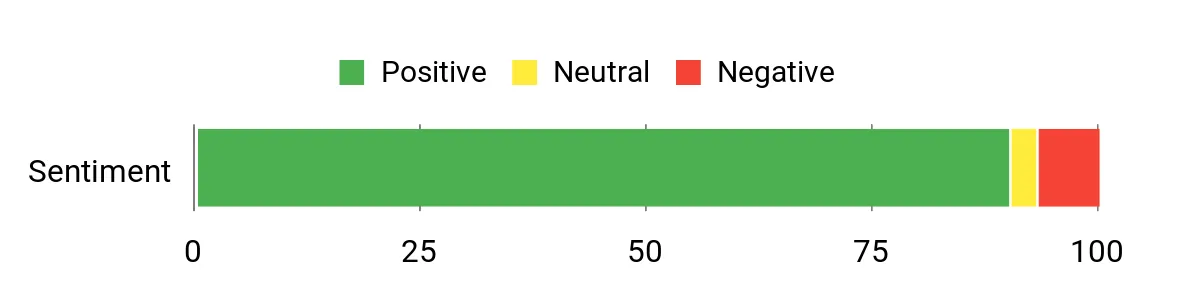
People commonly praise the OLED screen and ergonomics first — it looks gorgeous and fits comfortably in the hands for long sessions. Reviewers also highlight the roomy storage and the convenience of SteamOS and desktop mode, while many note battery life varies by game and that the Deck isn’t always the best choice for the newest, most demanding AAA titles.
A few customers mention minor shipping or packaging hiccups, but most are impressed with the overall build and play experience.
Overall Sentiment: Positive
Pros | Cons |
|---|---|
✅ Beautiful OLED HDR display that elevates games and emulators | ❌ Aging APU means the very latest AAA games may need lowered settings |
✅ 1TB NVMe SSD and 16GB RAM give plenty of room for games and quick loading | ❌ Battery life can swing widely depending on the title and settings |
✅ SteamOS makes library management and game launching easy | ❌ Some users report shipping/packaging or small quality-control issues |
✅ Good connectivity options for docking to a monitor or TV | ❌ Less plug-and-play flexibility than Windows-based handhelds for non-Steam stores |
✅ Comfortable controls and included carrying case improve portability |
Situational Benefits
Situation | How It Helps |
|---|---|
Short commutes and quick breaks | You can jump into Steam games quickly thanks to fast storage and sleep/wake, making short journeys or coffee breaks feel productive. |
Long flights and travel | The comfy grips and included carrying case make it easy to play for stretches, and fast charging gets you topped up between connections. |
Couch gaming or TV setup | Plug a dock or USB-C monitor into the Steam Deck to use desktop mode and play on a bigger screen without hauling a full PC. |
Retro collection and emulation | The OLED screen and responsive controls make older games look and feel great, and the Deck’s storage lets you keep a large backlog with you. |
Versatility
You get a device that’s comfortable as a dedicated Steam handheld but still flexible enough to run desktop mode, add a microSD card, or connect to displays — useful whether you stick to Steam or like to tinker.
Innovation
The OLED panel with HDR and a 90Hz refresh brings an eye-catching visual upgrade to Valve’s handheld line, combining brighter highlights and fast response for a premium portable display.
Comfort
Ergonomics are a highlight: the button layout and weight balance make long sessions easier on your hands, and small touches like textured grips help during marathon play.
Travel Friendliness
It fits in most day bags and the included carrying case is handy for trips. Keep in mind battery life will depend a lot on what you play, so plan for charging on longer journeys.
Performance & Speed
The 6 nm AMD APU with RDNA 2 graphics delivers solid performance for indies, older AAA titles and emulation, but if raw power for the newest AAA games is a priority, devices like the ASUS ROG Ally can pull ahead in benchmarks.
Key Benefits
- Stunning HDR OLED display with high peak brightness and up to 90Hz
- Large 1TB NVMe SSD and 16GB LPDDR5 for roomy storage and smooth multitasking
- SteamOS-focused interface for easy access to your Steam library
- Good connectivity: Wi‑Fi 6E, Bluetooth 5.3 and USB-C display output
- Solid ergonomics and included carrying case for portability
Rating: 4.6 (total: 291+)
FAQ
Which Handheld Wins On Performance And Battery Life?
You’ll find tradeoffs rather than a single winner: the ASUS ROG Ally (the ROG Xbox Ally Z2 models) leans toward raw Windows PC performance with a Ryzen Z2 A chip and 16GB RAM, which gives you higher frame rates on demanding AAA titles and a 7″ 120Hz display for smoother visuals, but that extra power tends to eat battery faster and can require more thermal tuning. The Steam Deck OLED runs SteamOS with Valve’s optimizations, so you often get better battery behavior and a more consistent out‑of‑box experience for Steam games, especially older or less demanding titles. If you care about maximum native PC compatibility and high refresh gameplay, the Ally is compelling; if you want longer session times, a polished Steam-centric experience, and less tinkering, the Steam Deck is appealing. The Lenovo Legion Go is another option to consider if you want a different balance of ports, ergonomics, or a high‑performance Windows experience, so factor in the kinds of games you play and whether you value raw power or battery longevity when you choose.
Will My Games From Steam And Xbox Game Pass Work Smoothly?
You can play games from multiple stores on both devices, but the experience differs: on the Steam Deck many Steam titles will run well thanks to Proton and community compatibility profiles, though some anti‑cheat titles or games that rely on third‑party launchers may need workarounds. The ASUS ROG Ally runs Windows, so you get broader native compatibility with Steam, Epic, and Xbox apps and easier access to Xbox Game Pass native apps and cloud streaming, but you may encounter driver or stability tweaks that require hands‑on updates. Cloud gaming (Xbox Cloud Gaming) works on both if you have a good connection and an active subscription. Practical tip: before you buy, check compatibility resources like ProtonDB for specific Steam titles, verify whether your must‑play games use problematic anti‑cheat, and plan for occasional driver updates and controller mapping adjustments.
How Reliable Are These Handhelds And What About Support?
You should expect different levels of polish and potential maintenance: Valve’s Steam Deck line tends to be more consistent for everyday use and benefits from a large community and regular SteamOS updates, while Windows handhelds like the ASUS ROG Ally can deliver great performance but sometimes require more troubleshooting, firmware updates, or driver fixes — users report mixed experiences with stability and occasional device‑specific quirks. Lenovo Legion Go also falls into the high‑performance Windows category and has its own support ecosystem. My advice is to buy from an authorized retailer, register your device for warranty, keep firmware and drivers up to date, and test the unit thoroughly during the return window so you can exchange it if you hit hardware issues.
If you don’t enjoy tinkering with settings and updates, prioritize a device with strong out‑of‑box stability; if you like customizing performance profiles and squeezing every frame, a Windows handheld may be worth the extra maintenance.
What Gamers Prefer
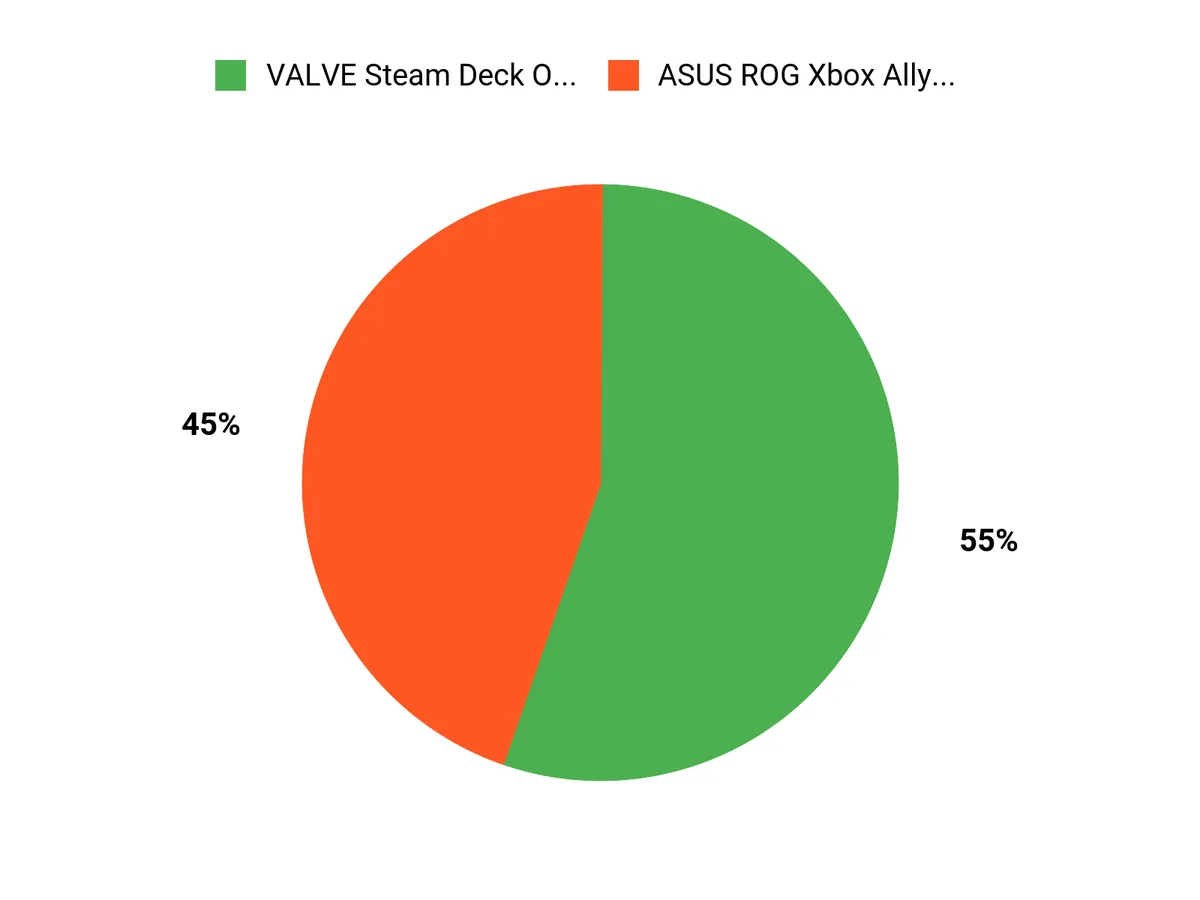
You usually weigh whether you want the ASUS ROG Ally Z2’s Windows-native performance, higher frame rates, and easy access to Xbox Game Pass against the Steam Deck OLED 1TB’s polished SteamOS integration, OLED display and handheld-friendly ergonomics. In short, you prioritize raw power and PC compatibility if you want a portable powerhouse, but choose the Steam Deck when seamless Steam library access, battery efficiency, and a console-like handheld experience matter more.
Wrapping Up
If you want the smoothest route to your existing Steam library, consistent ergonomics, and an excellent OLED screen, the Steam Deck OLED is the safer, more polished choice and is well suited if you prioritize compatibility and longevity. At $824.99 it leans premium but delivers on the core handheld PC promise.
If you prefer a Windows-first handheld with native access to Xbox Game Pass, a 7″ 120 Hz panel, and strong raw specs for cloud and native gaming, the ROG Xbox Ally ($589.99) is compelling — just be prepared for more setup, occasional software quirks, and shorter battery life in demanding titles. Use this comparison to match each console to how you play: choose Steam Deck for a library-first, reliable experience, or choose ROG Ally if you want Windows flexibility and Game Pass integration and are comfortable with occasional tinkering.
| ASUS ROG Ally | VALVE Steam Deck OLED | |
|---|---|---|
 |  | |
| Rating | 4.2/5 (223 reviews) | 4.6/5 (291 reviews) |
| Display Quality | 7″ 1080p FHD, 120Hz with FreeSync Premium | 7.4″ OLED, 1280 x 800, 90Hz |
| Processing Power | AMD Ryzen Z2 A, 16GB RAM, 512GB SSD | Custom AMD APU, 16GB RAM, 1TB SSD |
| Battery Life | Up to 2 hours of intensive gaming, 60Whr battery | Varies significantly depending on usage; good for dense games |
| Check Availability | Check Availability |
This Article is reader-supported. When you click through links we may earn a referral commission on qualifying purchases.