
Are you looking to seriously upgrade your gaming setup? You might think about a new GPU or a faster processor, but often, the biggest impact on your daily gaming comfort and performance comes from optimizing your environment.
Investing in monitor arms might not seem as exciting as a new graphics card, but they are a truly transformative upgrade for any gamer. They are important because they directly address common issues you face, like limited desk space, poor ergonomics, and a lack of flexibility in your display setup. By using monitor arms, you gain the ability to perfectly position your screens for ideal viewing angles, reduce neck and eye strain, and free up valuable desk real estate for peripherals, snacks, or even just a cleaner aesthetic.
You will find your gaming sessions become more comfortable, more immersive, and more organized.
Top Picks
| Category | Product | Score |
|---|---|---|
| 🏆 Best Overall Dual Monitor Arm | HUANUO Dual Monitor Stand | 92/100 |
| 💰 Best Value Dual Monitor Arm | VIVO Dual Monitor Desk Mount | 88/100 |
| 🎯 Best Single Monitor Arm | WALI Single Monitor Mount | 85/100 |
Choosing The Right Monitor Arm For Your Gaming Setup
When you are selecting a monitor arm, consider several key factors to ensure it meets your specific gaming needs. First, think about compatibility: Does the arm support your monitor’s size and weight?
You should check both the screen diagonal and the monitor’s actual weight against the arm’s specifications. Next, adjustability is crucial.
Look for arms that offer a wide range of motion, including height adjustment, tilt, swivel, and rotation, so you can achieve your ideal ergonomic setup. Stability and durability are also paramount; a sturdy arm will prevent wobbling during intense gaming sessions and protect your valuable equipment.
Consider the mounting type your desk can accommodate, whether it is a C-clamp or a grommet mount. Finally, evaluate cable management features, as these can help you maintain a clean and organized gaming space, reducing clutter and improving aesthetics.
HUANUO Dual Monitor Stand

So, you’re looking to level up your gaming setup, right? This HUANUO Dual Monitor Stand might just be your new best friend.
Imagine reclaiming all that precious desk space usually taken up by bulky monitor bases. With this stand, your monitors literally float, giving you a super clean and organized look.
It’s not just for aesthetics though; it’s incredibly practical. Whether you’re in the middle of an intense gaming session, juggling multiple windows for work, or just watching a movie, you can effortlessly tweak your screen position. You can swivel a screen to show a friend something cool, tilt it to reduce glare from that annoying window, or rotate it vertically for that epic strategy guide.
It’s perfect for those long gaming marathons, helping you stay comfortable, or even just for your everyday browsing. It’s truly a game-changer for your desk.
What People Say
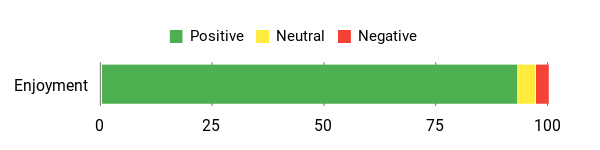
Folks are really raving about how much this monitor arm transforms their workspace. They often highlight how simple it is to set up and how incredibly sturdy it feels once everything is in place. Many are thrilled with the newfound desk space and the ease with which they can adjust their screens. While a few noted minor points like specific desk clearance or height preferences, the overwhelming sentiment is that it’s a robust, reliable, and highly functional upgrade that makes a real difference in daily use.
Overall Sentiment: Highly Positive
🗣️ Adrian
This stand is surprisingly sturdy and super easy to adjust. I’ve got dual 27-inch monitors on it, and there’s no wobble, even when I’m typing away. Installation was straightforward, taking about 45 minutes. Plus, you can easily tweak the joint tightness to perfectly suit your monitors.
🗣️ Elizabeth M
These arms are fantastic once you’ve adjusted the tension. They move around smoothly, just like you see in videos. They’ve really helped me free up valuable desk space, keeping my screens stable and in a great ergonomic position. The cable management is a nice bonus for a tidy setup.
Your Comfort First
| Benefit | Description |
|---|---|
| Improved Posture | Elevating your monitors to eye level helps you sit up straighter, reducing hunching. |
| Reduced Neck & Shoulder Strain | Proper screen height and angle mean less looking down or craning, easing tension. |
| Less Eye Strain | Adjusting tilt and distance helps minimize glare and maintain optimal viewing distance. |
| Enhanced Comfort | Customizable positioning ensures you stay comfortable during long gaming or work sessions. |
| Better Blood Circulation | An ergonomic setup encourages better posture, which supports healthier blood flow. |
Setting Up Is a Breeze
| Feature | Ease Level |
|---|---|
| Installation | Straightforward (C-clamp or grommet options) |
| Monitor Adjustment | Smooth (Gas spring system for effortless movement) |
| Tension Setting | Simple (Allen wrench provided for joint tightness) |
| Cable Management | Included (Keep your desk tidy with integrated holders) |
| VESA Compatibility | Standard (Fits 75x75mm or 100x100mm patterns) |
Move Your Monitors Your Way
One of the coolest things about this monitor arm is how incredibly versatile it is. Whether you’re a gamer who needs one screen for the action and another for chat, or a remote worker juggling documents, it adapts to your needs.
You can tilt your screens to avoid glare, swivel them to share content with someone next to you, or even rotate one to portrait mode for coding or long documents. It supports a great range of monitor sizes too, from 13 up to 32 inches, and each arm can hold a good amount of weight, making it flexible for different setups.
Game On, Comfort On
Let’s talk comfort, because honestly, when you’re spending hours at your desk, it makes all the difference. This monitor arm lets you lift your screens to your perfect eye level, which is a total game-changer for your posture.
Say goodbye to that nagging neck and shoulder strain from constantly looking down. With the easy tilt and swivel, you can always find that sweet spot to reduce glare and keep your eyes happy.
It’s about creating an ergonomic setup that feels natural and supportive, so you can focus on your game or work without discomfort getting in the way.
Why You’ll Love This Stand
- Reclaims valuable desk space
- Enhances ergonomic comfort
- Offers flexible monitor positioning
- Provides stable and secure setup
- Supports various monitor sizes and weights
Rating: 4.6 (total: 29823+)
VIVO Dual Monitor Desk Mount

Thinking of tidying up your desk and getting your screens just right? The VIVO Dual Monitor Desk Mount is here to make that happen.
Imagine having two monitors floating effortlessly, freeing up all that valuable space where chunky factory stands used to sit. It’s perfect for intense gaming sessions, where you need one screen for the action and another for Discord or a walkthrough. Or maybe you’re a multi-tasking pro, bouncing between work documents and a casual video.
With this arm, you can tilt, swivel, and rotate your displays with ease, getting them exactly where you need them for optimal viewing and comfort. It’s a solid upgrade for any setup, making your gaming and work life smoother.
What People Say
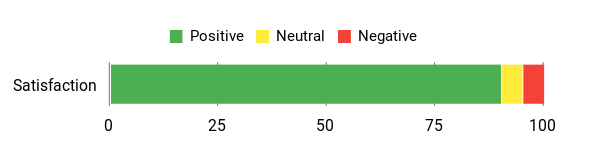
Users consistently praise this monitor mount for its solid construction and how well it handles their screens. Many highlight the simple installation process and the significant amount of desk space they gain once their monitors are mounted.
You’ll often hear how stable it feels, with screens staying exactly where you position them. While some heavier monitors might require a bit more adjustment to the tilt, the general consensus is that this VIVO mount is a robust and effective solution for optimizing your multi-monitor setup.
Overall Sentiment: Very Positive
🗣️ FallenRangerz
This mount has been amazing. It easily holds my two 27-inch monitors without any issues and clamps super tightly to my desk, staying put for years. The cable organizer on the back also really helps keep things looking neat and tidy, which is a huge plus for a clean setup.
🗣️ J. Farrugia
Honestly, the installation was smoother than a freshly buttered pancake, thanks to those detachable VESA plates. Getting my screens up felt like a breeze. The built-in cable management clips are like having little stylists for your cords, keeping everything super tidy. And the articulation features are incredibly versatile, letting you move your monitors exactly how you need them.
Boost Your Well-being
| Benefit | Description |
|---|---|
| Improved Posture | Elevating your monitors to eye level helps you sit up straighter, reducing hunching. |
| Reduced Neck & Shoulder Strain | Proper screen height and angle mean less looking down or craning, easing tension. |
| Less Eye Strain | Adjusting tilt and distance helps minimize glare and maintain optimal viewing distance. |
| Enhanced Comfort | Customizable positioning ensures you stay comfortable during long gaming or work sessions. |
| Better Blood Circulation | An ergonomic setup encourages better posture, which supports healthier blood flow. |
Setup Made Simple
| Feature | Ease Level |
|---|---|
| Installation | Easy (C-clamp or grommet options provided) |
| Monitor Attachment | Simple (Detachable VESA plates make mounting quick) |
| Adjustments | Smooth (Effortlessly tilt, swivel, rotate, and adjust height) |
| Cable Management | Convenient (Integrated clips keep wires neat and tidy) |
| Compatibility | Broad (Fits 13-30″ screens with VESA 75/100mm patterns) |
Customize Your View
This VIVO monitor arm truly lets you customize your view. Whether you’re arranging a dual-screen gaming command center or setting up an efficient workstation, its flexibility is a huge plus. You can easily switch your monitors between landscape and portrait orientations, tilt them to banish glare, and swivel them around to show off content to a friend or colleague.
It’s designed to handle a good range of monitor sizes and weights, making it a super adaptable choice for almost any desk setup you can dream up.
Comfort for the Long Haul
Long gaming sessions or workdays can be tough on your body, but this monitor arm aims to make things a lot more comfortable. By lifting your screens off the desk, you can set them at your ideal eye level, helping you maintain better posture and reduce strain on your neck and shoulders. The ability to easily tilt and adjust your monitors means you can find that perfect angle to minimize eye fatigue, ensuring you stay focused and comfortable for hours. It’s all about creating an ergonomic setup that supports you through every epic quest or important deadline.
Top Reasons to Love It
- Maximizes valuable desk space
- Offers highly flexible monitor positioning
- Provides a sturdy and durable setup
- Includes integrated cable management
- Supports dual monitors up to 30 inches
Rating: 4.5 (total: 59051+)
WALI Single Monitor Mount

Ever wonder how to get that perfect monitor setup without your desk looking like a chaotic wire jungle? The WALI Single Monitor Mount is your answer.
This arm lifts your single screen, whether it’s a massive 34-inch ultrawide or a standard 17-inch display, right off your desk, instantly freeing up precious space. Imagine gaming with a clear desk, or working with room for your coffee and notes. Its gas spring allows you to effortlessly adjust your monitor’s height, tilt, and swivel, giving you the best view for long hours of play or productivity.
It’s a simple, effective upgrade that seriously enhances your space and comfort.
What People Say
Folks who’ve tried this monitor mount often rave about how sturdy and reliable it feels, even with larger screens. Many highlight just how much extra desk space you suddenly gain, which is a game-changer for a cleaner setup.
You’ll hear that it’s generally a breeze to install and that the ability to move your monitor around freely is a huge plus for comfort. Some mention that adjustments can feel a bit firm initially, but it tends to loosen up with a bit of use, and a few wish the arm had a little more reach for wider desks.
Overall Sentiment: Very Positive

🗣️ Joe D.
This mount was surprisingly easy to set up and really feels high quality. I love that it offers so many ways to position my monitor, whether I need it close or far, or even vertical. You can either keep it flexible for on-the-fly adjustments or lock it down securely once you find your sweet spot.
🗣️ C & K
This monitor arm is a fantastic way to clear up desk space and upgrade your setup. It handles large monitors really well, with smooth adjustments for tilt, swivel, and rotation. The cable management feature is a bonus for keeping things tidy, and while it might feel a bit stiff at first, it gets smoother with use.
Game On, Comfortably
| Benefit | Description |
|---|---|
| Improved Posture | By lifting your monitor to eye level, you can straighten up and reduce slouching. |
| Less Eye Strain | Adjusting the screen’s tilt and distance helps cut down on glare and keep your eyes comfy. |
| Reduced Neck/Back Pain | Proper monitor height and angle align your spine, easing discomfort during long sessions. |
| Enhanced Focus | An ergonomic setup keeps you comfortable, so you can concentrate better on your game or task. |
Setup & Usage Ease
| Feature | Ease Level |
|---|---|
| Setup Options | Easy (Comes with both desk clamp and grommet options) |
| Mounting | Simple (Attaching your monitor is straightforward with standard VESA holes) |
| Adjusting | Smooth (Gas spring allows fluid movement for height, tilt, and swivel) |
| Cable Management | Convenient (Integrated system helps keep your cords tidy) |
| Monitor Compatibility | Broad (Works with most 17-34 inch flat or curved screens) |
Adjust to Your Needs
This WALI monitor arm is all about giving you options. Whether you’re setting up for an intense gaming marathon, diving into a work project, or just casually browsing, you can tweak your screen exactly how you like it.
Swivel your monitor to show off a cool moment to a friend, tilt it to avoid glare from that window, or rotate it vertically for coding or reading documents. Its sturdy build means it handles a good range of monitor sizes and weights, making it a flexible choice for almost any setup you can imagine.
Level Up Your Comfort
Imagine settling in for a long gaming session or a work crunch and feeling completely at ease. This monitor arm makes that possible.
By getting your screen off your desk, you can easily position it at your ideal eye level. This simple change can make a big difference, reducing strain on your neck and shoulders, and helping you avoid that common hunch. Plus, being able to adjust the tilt and distance means you can minimize eye fatigue, keeping you comfortable and immersed for hours on end.
It’s truly about making your digital life more comfortable.
Why You’ll Love This Mount
- Frees up valuable desk real estate
- Achieve perfect ergonomic monitor positioning
- Supports a wide variety of flat and curved screens
- Keeps cables neatly organized
- Offers stable and secure monitor mounting
Rating: 4.4 (total: 621+)
MOUNTUP Single Monitor Desk Mount

Tired of your gaming or work setup feeling cramped and messy? The MOUNTUP Single Monitor Desk Mount is here to rescue your desk space. This handy arm effortlessly lifts your monitor, whether it’s a compact 17-inch display or a large 32-inch screen, right off the desktop. Imagine all that new room for your gaming accessories, snacks, or simply a clutter-free zone.
Thanks to its smooth gas spring, you can easily tweak your screen’s position – tilt it up or down, swivel it side to side, or even rotate it for a vertical view. It’s designed to help you find that perfect viewing angle for long hours of intense gaming or focused work, making your setup not just look better, but feel better too.
What People Say
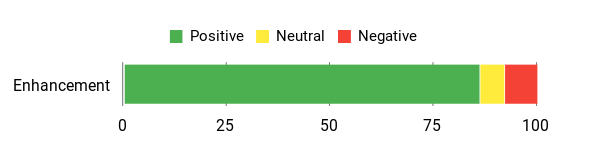
Users often cheer about how this monitor arm transforms their workspace, pointing out the immediate gain in desk space and the clean look it creates. You’ll frequently hear praise for how straightforward it is to set up, usually taking less than 15 minutes.
People also appreciate the solid construction and the ability to easily adjust their monitor for different tasks, whether it’s rotating for coding or tilting for optimal viewing. While most find the range of motion excellent, a few have noted that the tilt adjustment might need a strong hand, especially with heavier monitors, or that recent versions might feel a little different than older ones.
Overall Sentiment: Positive
🗣️ Andrew
East to put together, functions well, my monitor is still standing so it functions as described. I would recommend this to anyone who is in need of one.
🗣️ Skratazoid
So glad we found these! Purchased two of them for my home office monitors. My desk is not big and these saved so much space! They look nice and are of high-quality, so I am very happy. An added bonus was how they helped with cord management, everything looks nicer.
Better For You
| Benefit | Description |
|---|---|
| Better Posture | Helps you align your screen at eye level, which encourages a straighter back and less slouching. |
| Reduced Eye Strain | Allows easy tilting to eliminate glare and adjust distance, keeping your eyes more comfortable. |
| Alleviates Neck and Shoulder Pain | Positioning your monitor correctly can significantly reduce discomfort from prolonged use. |
| Improves Overall Comfort | A customizable setup means less fatigue, allowing you to stay focused and comfortable longer. |
Setting It Up & Using It
| Feature | Ease Level |
|---|---|
| Installation Process | Easy (Offers two common, drill-free methods: C-clamp or grommet) |
| Monitor Attachment | Straightforward (Standard VESA compatibility makes connecting your screen simple) |
| Adjustability | Smooth (Gas spring allows fluid movement for height, tilt, swivel, and rotation) |
| Cable Organization | Convenient (Built-in channels keep your wires neatly hidden and out of the way) |
| Initial Setup Time | Quick (Many users report setup in under 15 minutes) |
Flexibility For Any Setup
This MOUNTUP monitor arm is all about giving you options. Whether you’re setting up for an intense gaming marathon, diving into a work project, or just casually browsing, you can tweak your screen exactly how you like it. Swivel your monitor to share a cool moment with a friend, tilt it to avoid glare from that window, or rotate it vertically for coding or reading documents.
Its sturdy build means it handles a good range of monitor sizes and weights, making it a flexible choice for almost any setup you can imagine.
Your Comfort Zone
Imagine settling in for a long gaming session or a work crunch and feeling completely at ease. This monitor arm makes that possible. By getting your screen off your desk, you can easily position it at your ideal eye level. This simple change can make a big difference, reducing strain on your neck and shoulders, and helping you avoid that common hunch.
Plus, being able to adjust the tilt and distance means you can minimize eye fatigue, keeping you comfortable and immersed for hours on end. It’s truly about making your digital life more comfortable.
What It Does Best
- Clear up valuable desk space
- Achieve a custom ergonomic viewing position
- Support for a wide range of monitors (up to 32 inches, 17.6 lbs)
- Integrated cable management for a tidy setup
- Flexible mounting options (C-clamp or grommet)
Rating: 4.4 (total: 13491+)
HUANUO Dual Monitor Stand

You know that feeling when your desk is overflowing and your monitors are just… there? The HUANUO Dual Monitor Stand is here to completely transform your gaming or work area. This smart gas spring mount effortlessly lifts two monitors, up to 32 inches each, creating so much more space on your desktop.
Imagine having room for your snacks, notes, or even just a cleaner, more focused environment. It’s designed to let you adjust your screens precisely – tilt them for glare, swivel them to show a teammate something, or rotate them for a perfect vertical view. This means you can easily find that sweet spot for long hours of gaming or creative work, making your setup feel custom-made for you.
What People Say
Folks who use this monitor arm often rave about how much cleaner and more organized their desk feels. You’ll hear a lot about how straightforward it is to set up, with many saying they had it ready in under 15 minutes. Users appreciate its solid construction and the flexibility to adjust their monitors for any task, whether it’s stacking them or positioning side-by-side.
While the adjustability is generally praised, some users with particularly heavy monitors have noted that finding the perfect spring tension can take a bit of tweaking. Also, if you’re trying to stack two 32-inch monitors, be aware that it might be a tight fit vertically.
Overall Sentiment: Positive

🗣️ Jackson
Super easy to put together, took me maybe 10 minutes. The build quality is great — feels sturdy and holds both monitors with no issues. Adjusting the height and angle is easy, and it looks good on my desk.
🗣️ Ben N
Absolutely worth buying. Extremely sturdy even holding up the fairly large 27” and 32” monitors I have on them, plenty of space for moving them around even though it’s not necessary. Still holding up after multiple years. Simple to put together and to set up and should fit most monitors, will fit any desk width as well.
Better For You
| Benefit | Description |
|---|---|
| Improved Ergonomics | Helps you position your monitors at an optimal height and distance, reducing strain on your neck and eyes. |
| Reduced Discomfort | Alleviates common aches in your neck, shoulders, and back by promoting better posture during long sessions. |
| Better Viewing Angle | Easily adjust tilt to minimize glare and find the most comfortable perspective for your eyes. |
| Enhanced Productivity | A comfortable setup allows for longer focus and less fatigue, boosting your overall efficiency. |
Setting It Up & Using It
| Feature | Ease Level |
|---|---|
| Installation | Easy (Comes with clear instructions and both clamp/grommet options) |
| Monitor Attachment | Simple (Standard VESA compatibility ensures a hassle-free connection) |
| Adjusting Position | Smooth (Gas spring allows fluid movement for tilt, swivel, and height adjustments) |
| Cable Management | Convenient (Integrated channels help keep your workspace neat and cable-free) |
| Desktop Compatibility | Important to Check (Fits solid wood/metal desks 0.39″ to 3.54″ thick, no glass) |
Flexibility For Any Setup
This HUANUO dual monitor arm truly opens up a world of possibilities for your setup. Whether you’re juggling multiple applications for work, diving deep into an immersive game, or just enjoying some casual browsing, you’ve got the power to customize.
You can effortlessly tilt your screens to banish annoying glare, swivel them to share content with someone next to you, or even rotate them 360 degrees for a vertical display – perfect for coding or long documents. Its robust design means it can handle a good range of monitor sizes and weights, making it a super adaptable choice for almost any dual-screen arrangement you can dream up.
Your Comfort Zone
Think about those long gaming sessions or intense work marathons. You want to be comfortable, right?
This monitor arm helps you achieve just that. By getting your monitors off your desk, you can easily set them at the perfect eye level for you. This seemingly small change can actually make a huge difference in preventing neck stiffness and shoulder aches. Plus, with the ability to adjust the tilt and distance, you can fine-tune your view to minimize eye strain.
It’s all about creating a more ergonomic and enjoyable space where you can stay focused and feel good, even after hours of use.
What It Does Best
- Free Up Valuable Desk Space
- Achieve Personalized Monitor Positioning
- Support for Dual Monitors (Up to 32 Inches, 19.8 lbs Each)
- Keep Cables Tidy With Integrated Management
- Simple Installation With Two Mounting Options
Rating: 4.6 (total: 10359+)
FAQ
Why Should I Consider a Monitor Arm for My Gaming Setup?
A monitor arm is a fantastic upgrade for your gaming battlestation, offering several key advantages. Firstly, it provides superior ergonomics, allowing you to perfectly position your screen at eye level and reduce neck or back strain during long gaming sessions.
Secondly, it drastically frees up desk space by removing your monitor’s bulky stand, giving you more room for your keyboard, mouse, and other peripherals. You’ll enjoy a much cleaner and more organized setup. Thirdly, for multi-monitor users, arms enable seamless alignment and flexible positioning, letting you pivot, tilt, and swivel each screen independently to create an immersive panoramic view or even a stacked setup.
Fourthly, they often include integrated cable management systems, keeping your wires tidy and out of sight, which not only looks better but also prevents clutter. Lastly, the ability to effortlessly adjust your monitor’s height, angle, and distance means you can adapt your setup for different games or even switch between sitting and standing, truly enhancing your overall experience and comfort.
How Do I Choose the Right Monitor Arm for My Gaming Setup, Considering My Monitors and Desk?
Choosing the right monitor arm involves checking a few key compatibility points. First, ensure your monitor is VESA compatible; most arms support standard 75x75mm or 100x100mm mounting patterns. You’ll find these four screw holes on the back of your monitor.
Second, verify the arm’s weight capacity and screen size range match your monitor. Each arm has a maximum weight it can safely hold (e.g., up to 19.8lbs for some dual arms) and a recommended screen size range (e.g., 13 to 32 inches).
Make sure your monitor’s weight (without its original stand) and size fall within these limits. Third, consider your desk.
Most monitor arms offer two mounting options: a C-clamp for desks with an edge, or a grommet mount that goes through a hole in your desk. Check your desk’s thickness and if it’s sturdy enough to support the arm and monitors without wobbling. If you plan for multiple monitors, a dual arm is a great space-saving solution, allowing you to mount both screens from a single base.
After Installing My Monitor Arm, What Are Some Tips for Getting the Most Out of It and Handling Common Issues?
Once your monitor arm is installed, a little fine-tuning goes a long way. If you have a gas spring arm, the most important step is adjusting the tension. Use the provided Allen wrench to tighten or loosen the spring mechanism until your monitor stays firmly in place at any height you set it, without drifting up or down. If your monitor sags, tighten the tension; if it floats up, loosen it.
This ensures effortless adjustment. Next, make use of the integrated cable management clips or channels along the arm to route your monitor power and display cables neatly. This keeps your desk tidy and prevents tangles.
Experiment with different positions – tilt, swivel, and rotate your screen to find the perfect ergonomic sweet spot that minimizes glare and strain. If you notice any wobbling, ensure the clamp or grommet base is securely tightened to your desk.
A sturdy desk is key to preventing movement. Don’t be afraid to reposition your monitors to align them perfectly, especially if you have a multi-monitor setup, to create an optimal, immersive gaming field of view.
Why Gamers Choose
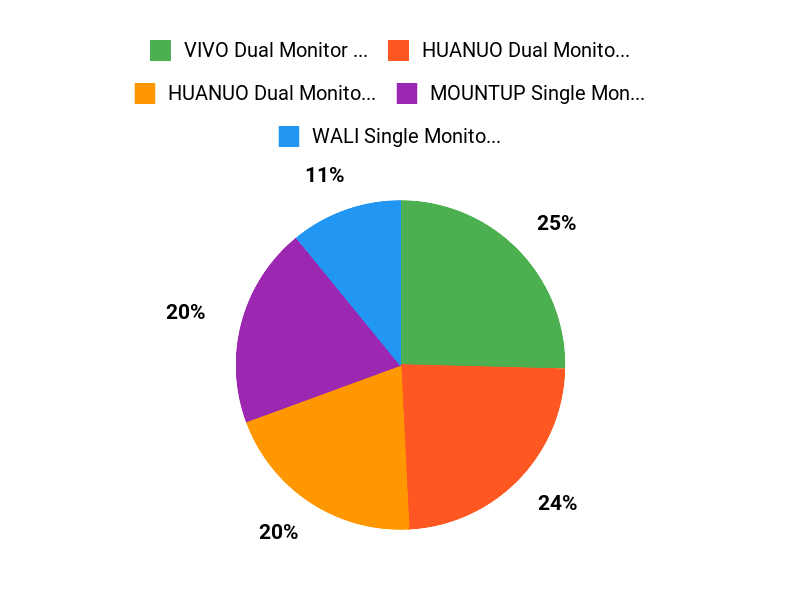
When you choose a monitor arm, its about elevating your game by reclaiming valuable desk space and achieving perfect ergonomic alignment for intense sessions. Your decision often hinges on whether you need dedicated support for a single, primary screen or robust, flexible arms for an immersive dual-monitor setup.
Ultimately, you prioritize stability, smooth adjustability, and a clean, organized look to maximize your gaming performance and comfort.
Wrapping Up
In conclusion, embracing monitor arms is a powerful way to significantly elevate your gaming experience. You gain unparalleled ergonomic flexibility, allowing you to position your screens precisely for maximum comfort and reduced strain during long gaming sessions.
This directly translates to improved focus and endurance. Furthermore, monitor arms effectively reclaim valuable desk space, transforming cluttered areas into organized battle stations, which is essential for managing peripherals and maintaining a clean setup.
They also offer a sleek, professional aesthetic that enhances the overall look of your gaming rig. By investing in a quality monitor arm, you are not just buying a piece of hardware; you are investing in a more comfortable, efficient, and ultimately more enjoyable gaming future. You will wonder how you ever gamed without one.
| Product | Image | Rating | Weight Capacity | Compatible Monitor Size |
|---|---|---|---|---|
| HUANUO Dual Monitor Stand |  | 4.6/5 (29,823 reviews) | 19.8 lbs per arm | 13 to 32 inches |
| VIVO Dual Monitor Desk Mount |  | 4.5/5 (59,051 reviews) | 22 lbs per arm | 13 to 30 inches |
| WALI Single Monitor Mount | | 4.4/5 (N/A reviews) | 26.4 lbs | 17 to 34 inches |
| MOUNTUP Single Monitor Desk Mount | | 4.4/5 (13,491 reviews) | 17.6 lbs | 17 to 32 inches |
| HUANUO 17-32 Inch Dual Monitor Stand |  | 4.6/5 (10,359 reviews) | 19.8 lbs per arm | 17 to 32 inches |
This Article is reader-supported. When you click through links we may earn a referral commission on qualifying purchases.