
You rely on a mix of webcams, microphones, capture cards, external drives and controllers to run a pro-level YouTube setup. A good USB hub keeps everything connected without constant swapping and helps you maintain reliable performance during recording and streaming.
This guide compares compact, powered and high-port hubs so you can pick the right balance of speed and power for your workflow.
Top Picks
| Category | Product | Price | Score |
|---|---|---|---|
| 🏆 Best Overall | Anker USB Hub 4 Ports (USB 3.0) | $9.99 | 95/100 |
| 💰 Best Value | UGREEN USB 3.0 Hub 4 Ports | $6.99 | 92/100 |
| ⚡ Best For Stability & Power | Acer USB Hub 4 Ports (USB 3.0) with Type-C Power Port | $11.99 | 90/100 |
| 🔋 Best Charging Companion | USB C Charger 200W (8-Port GaN Charger Station) – GKUTW | $35.94 | 88/100 |
| 🚀 Most Advanced / Best For Pro Setups | WENTER Powered USB Hub 11-Port (10 Data + 1 Charging) | $28.49 | 89/100 |
How We Picked These Hubs
You need hubs that match the demands of content creation: consistent data throughput for capture and external drives, enough power for microphones and receivers, and durable construction for daily use. We evaluated devices for: transfer speed (USB 3.0 / up to 5 Gbps), power delivery or ability to accept external power, number and spacing of ports, plug-and-play compatibility across Windows/macOS/Linux/Chrome OS, physical footprint and cable length, brand reliability and customer feedback, and price vs value.
We also considered studio-specific features like individual port switches and anti-slip housings so you can organize devices on your desk without accidental disconnects.
Acer 4-Port USB 3.0 Hub

If you run a YouTube setup, this little Acer hub is the kind of thing that quietly makes your life easier. You plug it into your laptop and suddenly you’ve got four extra USB-A ports for a webcam, microphone, external drive and a keyboard — no driver installs, just plug and play.
The hub supports USB 3.0 speeds up to 5 Gbps, and there’s a dedicated 5V USB-C power inlet you can use when you need extra stability (handy if you’re moving big video files or running multiple powered devices). It’s slim, lightweight and has a short 2 ft cable so it doesn’t clutter your desk or bag when you travel to a shoot.
Use it day-to-day to keep a neat workstation, or take it with you to a live stream or location shoot when you need reliable connections for several devices. If you want a straightforward, durable hub that keeps things running smoothly without fuss, this is a solid pick.
What People Say
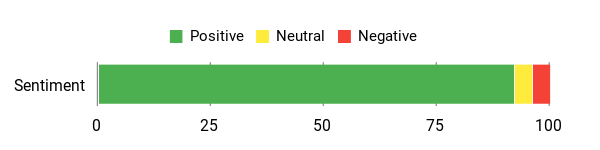
People say it’s reliable, fast for file transfers, and helpful when you need extra powered ports for external drives.
Overall Sentiment: Positive
🗣️ Josh
Plug & play simplicity — no drivers needed; the four USB-A ports work immediately. True USB 3.0 transfer rates (up to 5 Gbps) make moving large files fast and smooth. Slim 2‑ft cable and housing handle heat well. Note: the USB‑C port is only for supplying power to the USB‑A ports, not for data.
🗣️ Michael J. Kramer
Works great with two external hard drives when you add the USB 5V power supply. Earlier hubs without external power caused erratic mouse behavior and slow transfers; this one solved that by supplying stable power to drives.
When It Helps
| Situation | How It Helps |
|---|---|
| Editing sessions with external drives | Use the 5V USB‑C power inlet to stabilize transfers and avoid drops when moving large video files. |
| Live streaming or multi-device desk setup | Gives you four extra USB slots so your webcam, mic, keyboard and mouse can all stay connected without swapping cables. |
| Working on the go or at a location shoot | Slim 2 ft cable and lightweight design fit in your bag and keep your laptop setup tidy. |
| Replacing flaky hubs | Many users report better stability and fewer connection issues compared with lower-quality hubs. |
Ease of Use
| Feature | Ease Level |
|---|---|
| Setup | Easy |
| Connecting multiple peripherals | Easy |
| Using the 5V power input | Moderate |
| Portability and packing | Easy |
Versatility
You can use it with laptops, desktops, consoles and most modern OSes — it’s a general-purpose hub that fits lots of studio needs whether you’re streaming, editing, or plugging in accessories.
Compatibility
| Platform | Compatibility Level |
|---|---|
| Windows (including Windows 11) | High |
| macOS | High |
| ChromeOS / Linux | Good |
| Game consoles (PS4, Xbox) | Good |
Practicality
Practical for everyday desk use and portable enough to bring to shoots; the powered-input option makes it suitable for heavier tasks like running external drives.
Problem Solving
Solves common studio pain points: not enough USB ports, slow transfers, and unstable connections when multiple devices draw power.
Key Benefits
- Adds four USB 3.0 USB‑A ports for peripherals
- Up to 5 Gbps data transfer for quick file moves
- Optional 5V USB‑C power input for stable performance with drives
- Plug-and-play design — no drivers required
- Slim, portable body with LED activity indicator
Rating: 4.6 (total: 9,544+)
Anker USB Hub 4 Ports

If you’re putting together a YouTube studio, this little Anker hub is the kind of practical helper you barely notice until you don’t have it. Plug it into your laptop and you instantly free up room for a webcam, mic receiver, external drive and a keyboard without swapping cables. It supports USB 3.0 speeds (up to 5 Gbps) so copying footage or transferring clips is noticeably quicker than USB 2.0, and the slim 2 ft cable keeps your desk tidy.
The housing is engineered to resist heat, so it stays stable during long editing sessions. One important thing to remember: it’s meant for data — not for charging power-hungry devices.
For everyday streaming, editing, or on-location shoots where you need reliable connections for multiple peripherals, this is a handy, low-fuss pick.
What People Say
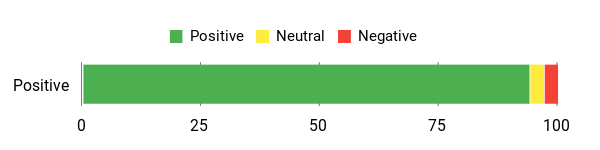
People appreciate that it’s reliable, fast for file transfers, compact for travel and simple to use — just don’t expect it to charge power-hungry drives.
Overall Sentiment: Positive
🗣️ Pattykeki
I’m using this in my ’23 Tesla Model Y glovebox to connect a flash drive and a USB LED strip; the dash cam recordings and LED powered fine and the hub held up well — sturdy plastic but solid. The 2 ft cable fit my layout and everything worked without issue.
🗣️ Wesley Tucker
Speeds are as advertised and the PC recognizes anything I plug in. Transferring files with multiple devices connected was smooth and reliable — plug and play with true USB 3.0 transfer rates.
When It Helps
| Situation | How It Helps |
|---|---|
| Connecting a webcam, mic and keyboard for streams | Gives you four extra USB‑A slots so you can leave everything plugged in and avoid swapping cables mid‑stream. |
| Copying footage from cameras or SSDs | USB 3.0 speeds (up to 5 Gbps) mean clips move faster; great for short editing sessions and quick backups. |
| Using in a car or glovebox (dash cam/LED setups) | Slim size and a short cable make it easy to tuck away while letting multiple accessories run reliably, as reviewers have reported. |
| Traveling to location shoots | Lightweight and compact so it fits in your bag and gives you immediate extra ports without extra adapters. |
Ease of Use
| Feature | Ease Level |
|---|---|
| Setup | Easy |
| Plug-and-play recognition | Easy |
| Managing multiple peripherals | Easy |
| Powering high-draw devices | Moderate |
Versatility
You can use it with laptops, desktops and many devices that still rely on USB‑A — it’s great for streaming rigs, basic editing setups and general desktop expansion, but not intended to power external drives that need a lot of current.
Compatibility
| Platform | Compatibility Level |
|---|---|
| Windows | High |
| macOS | High |
| Linux / ChromeOS | Good |
| Game consoles (PS/Xbox) | Good |
Practicality
Practical for daily desk use and travel when you need extra ports for peripherals and fast transfers. Keep in mind it’s designed for data, so high‑power devices may require a powered hub.
Problem Solving
Solves the common studio problem of not having enough USB ports and speeds up file transfers; it won’t replace a powered hub if you need to run several power-hungry accessories.
Key Benefits
- Adds four USB 3.0 USB‑A ports so you can keep camera, mic, keyboard and drives connected
- Up to 5 Gbps transfer speeds for faster file moves and smoother editing workflows
- Slim, lightweight design with a 2 ft cable that reduces desk clutter and fits in a bag
- Durable, heat‑resistant housing that stays stable during long sessions
- Plug-and-play — most systems recognize it instantly without drivers
Rating: 4.7 (total: 134,161+)
UGREEN USB 3.0 Hub 4-Port

If you need more USB ports for a streaming or editing setup, this UGREEN hub makes life easier. Plug it into a laptop or desktop and you gain four USB‑A slots for a webcam, mic receiver, keyboard and external drive without swapping cables. It supports USB 3.0 speeds (up to 5 Gbps) so copying clips is noticeably faster than older hubs, and the slim, lightweight body tucks into a bag for location shoots or travels. It’s mostly plug-and-play across Windows, macOS, Linux and even many consoles, but keep in mind it’s meant for data — very power-hungry peripherals or some wireless receivers may work better with a powered hub.
For everyday streaming, editing, or on-the-go setups, it’s a practical, no-fuss addition to your kit.
What People Say
Users like that it reliably expands ports, moves files quickly, and stays compact — a handy everyday tool for streamers and creators.
Overall Sentiment: Positive

🗣️ William W.
I have a dense old desk and a dual monitor setup that hogs space. Having four USB slots through one port didn’t hinder data — I used a controller, microphone and USB camera at the same time and they all worked as intended. Cables snap into place and stayed in the slots even when the hub hung off the front of my desktop.
🗣️ Rocky
The hub is a fantastic addition to my desk. Build quality feels solid, transfers are fast and reliable, and it’s plug-and-play with laptop and desktop. One thing to note: my wireless headphones with a USB receiver needed a powered hub, so if you rely on that kind of receiver check the device requirements.
When It Helps
| Situation | How It Helps |
|---|---|
| Setting up a home streaming rig | Gives you extra USB‑A slots so your webcam, mic receiver and keyboard can stay plugged in without juggling cables mid‑stream. |
| Copying footage between drives | USB 3.0 speeds (up to 5 Gbps) mean clips transfer much faster than USB 2.0, which speeds up rough edits and backups. |
| Packing for location shoots or travel | Its slim, lightweight design fits in a camera bag and instantly adds ports to a laptop on the road. |
| Working with a cramped desktop tower | A short hub cable brings ports to a reachable spot so you don’t have to crawl behind your case every time you plug something in. |
Ease of Use
| Feature | Ease Level |
|---|---|
| Setup | Easy |
| Plug-and-play recognition | Easy |
| Transferring files | Easy |
| Powering high-draw devices or some wireless receivers | Moderate |
Versatility
Works with laptops, desktops and many USB‑A devices including peripherals and storage; handy for streaming, light editing and travel. Not intended as a replacement for a powered hub when you need to run multiple high-current devices.
Compatibility
| Platform | Compatibility Level |
|---|---|
| Windows | High |
| macOS | High |
| Linux / ChromeOS | Good |
| Game consoles (Xbox, PS5) | Good |
Practicality
Practical for everyday desk use and portable setups where you need reliable data connections for several peripherals. Keep a powered hub in mind if you need to run multiple power-hungry accessories.
Problem Solving
Solves the common pain of not having enough USB ports and speeds up file transfers; won’t substitute for a powered hub when peripherals require extra current.
Key Benefits
- Adds four USB 3.0 USB‑A ports so you can keep camera, mic, keyboard and drives connected
- Up to 5 Gbps transfer speeds for faster file moves and smoother editing workflows
- Very compact and lightweight — easy to toss in a bag for location shoots or travel
- Plug-and-play on Windows, macOS, Linux and many consoles with no drivers required
- Slim cable and low-profile body reduce desk clutter and make placement flexible
Rating: 4.7 (total: 14602+)
GKUTW 200W 8‑Port USB‑C Charger

If you want to cut down on messy bricks and keep every device topped up while you record, this 8‑port GKUTW charger is the kind of everyday tool you’d reach for. It uses GaN III tech to stay compact while delivering up to 200 W total and a 65 W PD output for a laptop, plus multiple fast outputs for phones and tablets. You can park it on a desk, tuck it into a travel bag or mount it out of the way — the 1.5 m power cord makes placement flexible. In practice it replaces a handful of wall adapters, keeps several devices charging at once without obvious slowdowns, and is handy for family, travel, or a multi‑device studio setup.
If you need a simple way to consolidate charging and free up outlets, this is a solid, practical pick.
What People Say
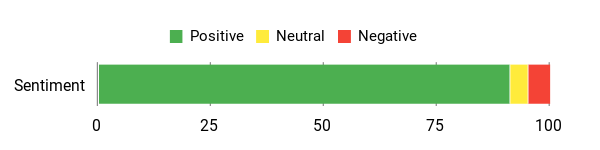
People like that it reliably charges many devices at once, frees up desk space, and travels well — a handy hub for families and creators alike.
Overall Sentiment: Positive
🗣️ AgileGuru
I’ve used other chargers but with a family of four this one became our charging station. The mix of USB‑C and USB‑A ports handled 4–6 devices at once and stayed in fast‑charge mode. I even mounted it with double‑sided tape and it’s held up for months.
🗣️ Rob O’Hara
I put this on the far side of my desk to free up space. With four USB‑A and four USB‑C ports and 200 W total output it charges phones, tablets and even laptops — it replaced a power strip full of bulky bricks.
When It Helps
| Situation | How It Helps |
|---|---|
| Home studio with multiple gadgets | Keeps your webcam, phone, mic, and tablet charged from a single station so you don’t swap adapters during a stream. |
| Packing for travel or hotel stays | One compact unit replaces multiple bricks and lets you charge phones and tablets for several people from a single outlet. |
| Clearing desk clutter | Consolidates chargers into one spot and the long cord lets you position it out of the way while keeping devices nearby. |
| Small business or multi‑tablet setups | Handles several tablets or devices at once, useful for kiosks, stores or shared workstations. |
Ease of Use
| Feature | Ease Level |
|---|---|
| Setup | Easy |
| Plug-and-play charging | Easy |
| Placement and mounting | Moderate |
| Managing many cables | Moderate |
Versatility
You can use it with phones, tablets, laptops (PD 65 W), game devices like Steam Deck and small accessories — it’s flexible for home, travel and small shared setups.
Compatibility
| Platform | Compatibility Level |
|---|---|
| macOS / MacBook | High |
| Windows laptops (Dell, Surface, etc.) | High |
| Android phones & tablets (USB‑C) | High |
| Portable consoles & accessories (Steam Deck, earbuds) | Good |
Practicality
Practical for consolidating multiple chargers into one compact station, freeing outlets and cutting clutter — useful at home, in a studio, or in a travel bag.
Problem Solving
Solves the common problem of juggling many chargers and messy cords by centralizing power for several devices; while most users report months of reliable use, a small number noted limited lifespan, so treat it as a convenient everyday solution rather than an industrial charger.
Key Benefits
- Eight independent ports (4 USB‑C + 4 USB‑A) so multiple devices can charge simultaneously
- GaN III chipset keeps the unit compact while improving efficiency and heat dissipation
- PD 65 W output for laptop charging alongside phone and tablet fast charging
- Long 1.5 m / 5 ft power cord for flexible placement on desk, nightstand or counter
- Portable and travel-friendly — replaces several bulky wall adapters
Rating: 4.6 (total: 1,435+)
WENTER 11‑Port Powered USB Hub

If you’re juggling a camera, mic, external drives and a phone while you record, this WENTER hub turns a chaotic desk into something calmer. It gives you ten USB 3.0 data ports plus a dedicated smart charging port, each with its own on/off switch and LED so you can power only what you need.
The included 12V/3A adapter makes it a powered hub, which means you can run several power-hungry peripherals—think portable SSDs, a capture card and a keypad—without stealing power from your laptop. It’s plug-and-play, works with older USB devices, and the longer cables make placement flexible.
For everyday streaming or those marathon editing sessions where you attach multiple drives, it’s a practical, no-drama way to expand ports and keep things tidy. If you want to stop swapping cables mid-recording, this is the sort of tool you’ll reach for.
What People Say
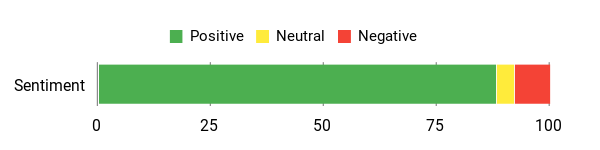
People highlight that it reliably handles many drives at once, the individual switches are handy, and the powered design keeps peripherals stable during heavy use.
Overall Sentiment: Positive
🗣️ CJ
This hub has proven to be a reliable solution for managing multiple SSDs simultaneously. The 10 data transfer ports deliver consistent USB 3.0 speeds without noticeable performance degradation when all ports are occupied. The included power adapter supplies ample power — I’ve had 10 portable SSDs connected and running concurrently without any power-related disconnections or instability issues. The individual power switches with LED indicators are particularly useful for SSD management, allowing you to selectively power drives on and off without unplugging them.
🗣️ L F C
I was hoping for a lot from this product and it delivered. It worked for both of my MacBooks. The size is right, the base is stable, and I can shut off ports I don’t need. It saved me when one of my MacBook USB ports stopped working — without this hub I wouldn’t have been able to connect my backup drive. Cord length could be a tad longer, but overall it hit my needs.
When It Helps
| Situation | How It Helps |
|---|---|
| Recording sessions with multiple peripherals | You can connect a mic, webcam, capture card and phone at once and switch ports on or off without unplugging. |
| Editing with external SSDs | The powered ports and solid USB 3.0 speeds let you run several SSDs for fast transfers and smoother editing. |
| Sim racing or multi-controller setups | It supplies stable power to wheels, pedals and controllers so inputs remain reliable during long sessions. |
| Laptop with limited ports | Plugs into a single USB A port to give you a whole strip of usable ports for peripherals and backups. |
Ease of Use
| Feature | Ease Level |
|---|---|
| Setup | Easy |
| Plug-and-play operation | Easy |
| Using individual switches | Easy |
| Cable management | Moderate |
Versatility
You can use it for phones, cameras, keyboards, mice, external SSDs, printers or game peripherals — it fits a home studio, a desk with limited ports, or a sim-rig where many controllers need power.
Compatibility
| Platform | Compatibility Level |
|---|---|
| macOS / MacBook | High |
| Windows (desktops & laptops) | High |
| External drives (USB 3.0 / SSDs) | High |
| Older USB 2.0 / 1.1 devices | High |
| Game consoles (PS4, Xbox One) | Good |
Practicality
It’s a practical desk tool when you need more physical ports and steady power. The individual switches reduce wear on frequently swapped devices, and the powered design means you can run several peripherals without overloading your laptop.
Problem Solving
Solves the common problem of too few USB ports and unstable power for multiple devices. Users report stable transfers with many SSDs attached and fewer connection headaches during streams or long recording sessions.
Key Benefits
- Expands a single USB A port into 10 USB 3.0 data ports plus 1 dedicated smart charging port
- Individual on/off switches and LEDs let you power only the devices you need
- Powered with a 12V/3A adapter so multiple drives and peripherals get stable power
- Backward compatible with USB 2.0 and 1.1 devices and supports plug-and-play hot swapping
- Longer USB and power cables give you flexibility to place the hub where it fits your desk
Rating: 4.5 (total: 3,883+)
FAQ
How Do I Choose The Right USB Hub For A Pro-Level YouTube Studio?
You should start by thinking about what you plan to connect and whether those devices need lots of power or bandwidth; a compact 4-port USB 3.0 hub is great for keyboards, mice, and webcams, while a powered hub with many ports is better when you add multiple external drives, lights, or chargers. Look for USB 3.0 (up to 5 Gbps) if you move large video files, check compatibility with your operating system, and prefer a model with a Type-C power input if you might add power-hungry peripherals — just know that some hubs (for example, certain Acer models) let the Type-C port supply power to the hub ports but don’t use that port for laptop charging or data passthrough.
Also consider cable length and port spacing so bulky connectors and capture cards fit comfortably, and choose a hub with heat-resistant housing, anti-slip feet, and indicator lights for smoother studio use.
Will A USB Hub Affect My Camera, Microphone, Or External Drive Performance?
It can, but usually only if the hub isn’t matched to the device demands; webcams and USB microphones typically use very little bandwidth and work fine through a good USB 3.0 hub, but high-resolution capture cards and multiple external hard drives can hit the hub’s shared bandwidth or power limits. Keep high-bandwidth or latency-sensitive devices plugged directly into your computer or into a powered hub, and use an AC‑powered hub when connecting spinning HDDs or multiple SSDs so you avoid dropouts.
Remember that USB ports on a hub share the same upstream connection, so adding more devices doesn’t multiply throughput — it divides it, which is a common misconception. If you see slow transfers or erratic peripherals, try moving the problematic device to a dedicated port or a powered hub and avoid daisy-chaining unpowered hubs.
How Should I Set Up And Maintain A USB Hub In My Studio To Avoid Connection Issues?
Place the hub where cables are tidy and strain‑relieved, avoid running very long cables between capture gear and the hub, and secure the hub so plugs don’t wiggle during recording; frequent unplugging while recording can cause device dropouts or data corruption. Use the hub’s external power input when you have multiple peripherals or any that draw noticeable current, keep ventilation clear so the hub can dissipate heat, and test each device before a live shoot to confirm stability.
Most modern hubs are plug‑and‑play across Windows, macOS, and Linux, but if a device acts up try restarting the host, switching ports, or connecting the device directly to isolate whether the hub is the issue.
What Creators Prefer
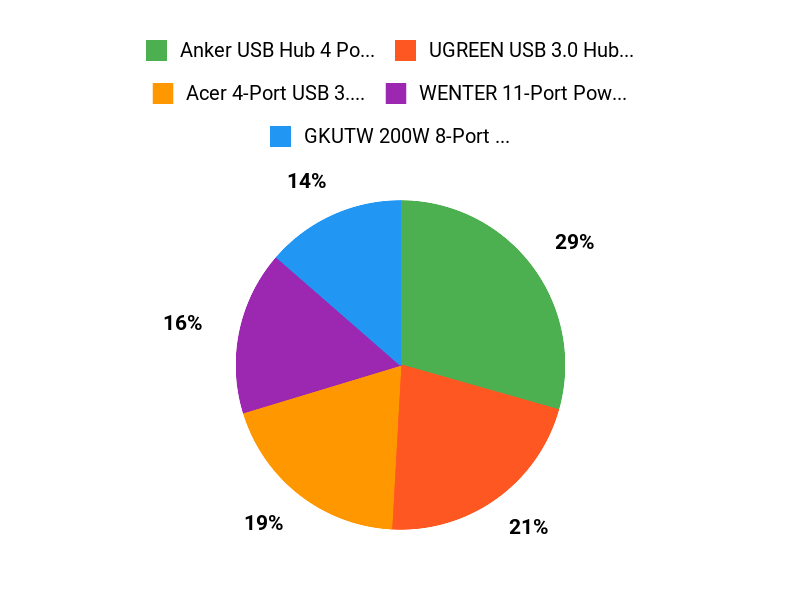
When you’re picking between the Acer, Anker, and UGREEN 4‑port USB 3.0 hubs for your YouTube studio, you mainly look for rock‑solid transfer speeds and stable connections so cameras, audio interfaces, and lights don’t drop out. You’ll also balance build quality and whether the hub is powered against price and portability, plus small conveniences like metal housing, individual port switches, or an included power adapter depending on whether you need a compact travel solution or a heavy‑duty desktop setup.
Wrapping Up
To build a pro-level YouTube studio you want a setup that removes friction so you can focus on content. Pick a compact 4‑port hub like the Anker or Acer if you need straightforward, high-speed expansion for webcams, microphones and external SSDs.
Choose a powered, higher-port solution like the WENTER if you run many drives or peripherals simultaneously, and use a multiport GaN charger like the GKUTW to keep devices powered without tying up your computer. In short, match the hub to your device list and power needs — prioritize stable data transfer and sufficient power and you’ll avoid dropped frames, disconnects and wasted time during recordings.
| Acer USB Hub 4 Ports, Multiple USB 3.0 Hub | Anker USB Hub 4 Ports, Multiple USB 3.0 Hub | UGREEN USB 3.0 Hub, 4 Ports USB A Splitter | |
|---|---|---|---|
 |  |  | |
| Rating | 4.6/5 (9,544 reviews) | 4.7/5 (134,161 reviews) | 4.7/5 (14,602 reviews) |
| Ports | 4 USB 3.0 Ports | 4 USB 3.0 Ports | 4 USB 3.0 Ports |
| Special Highlights |
|
|
|
| Compatibility | Chrome OS, Linux, Windows 11, Desktops, Laptops, Gaming Consoles | Desktops, Keyboards, Laptops, USB Flash Drives | Laptops, Desktops, Keyboards, USB Flash Drives |
| Check Availability | Check Availability | Check Availability |
This Article is reader-supported. When you click through links we may earn a referral commission on qualifying purchases.